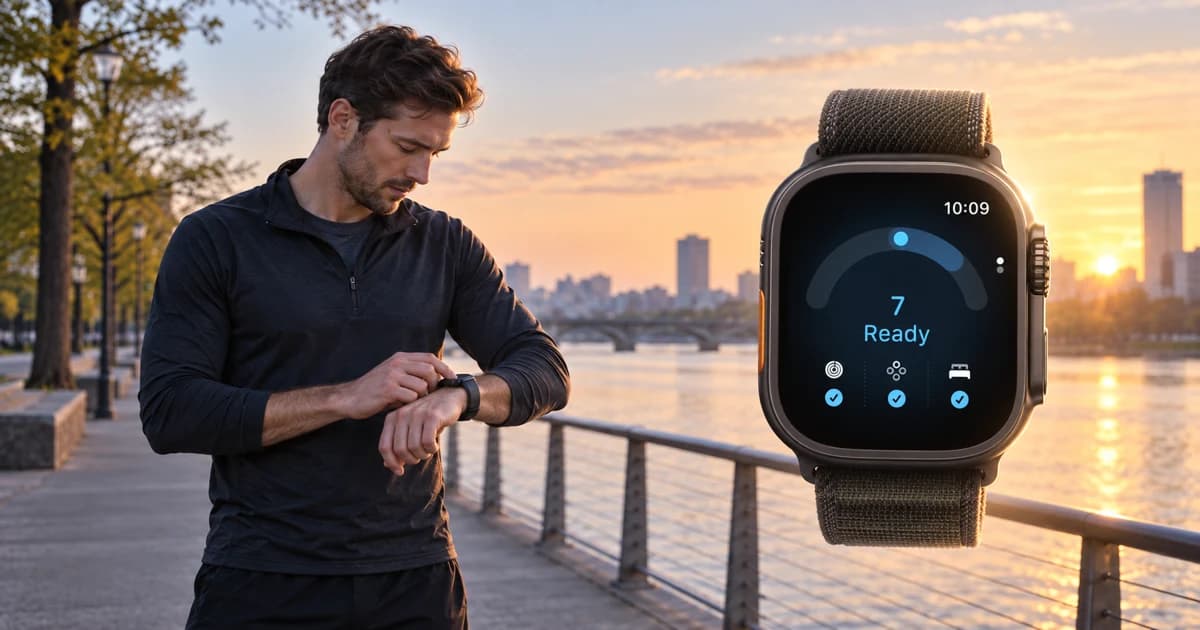
I upgraded to watchOS 27. Why can’t I see Apple Watch Readiness?
My first reaction to Apple Readiness was simple. I wanted to try it. The score looked close to Whoop Recovery and Garmin Training Readiness, both useful ideas for a runner deciding how hard to train. Then I updated my iPhone and Apple Watch and found no Readiness app anywhere.
I checked the Watch app, searched Health on my iPhone and went back through the watchOS 27 announcement. Nothing. For a while I assumed Apple was rolling the feature out slowly or that I had missed a setting.
The answer turned out to be hardware. Apple Readiness currently works only on Apple Watch Series 12 and Apple Watch Ultra 4. My older watch can run watchOS 27, but the software update does not add Readiness. iOS 27 does not add the score to Health on its own either. Apple documents Readiness as an app on those two new watches, with Health data feeding the calculation.
I am waiting for my Ultra 4 to arrive, so this is not a long-term hands-on review yet. It is the compatibility and setup guide I wish I had before I spent time looking for a feature my current watch could not show.
The compatibility detail I missed
Apple publishes a fairly long watchOS 27 compatibility list. Series 9, Series 10, Series 11, SE 3, Ultra 2 and Ultra 3 can all install the operating system. The Readiness list has only two watches on it.
This explains the confusing experience. A successful update tells you that the watch supports watchOS 27. It says nothing about Readiness. The feature relies on Apple's separate feature list, which currently names Series 12 and Ultra 4. Apple has not announced support for earlier models or explained the exact technical boundary.
Apple says watchOS 27 requires an iPhone 11 or later, or iPhone SE 2 or later, running iOS 27. That is the operating-system requirement. Series 12 and Ultra 4 setup has its own iPhone requirement, and Readiness still needs one of those two watches. You can verify the two lists on Apple's watchOS 27 page and Readiness support page.
A supported watch still needs seven nights
Buying the right watch does not produce a score on the first morning. Apple asks for personal details, activity setup, overnight vitals and sleep tracking. The watch then needs at least 7 nights of overnight-vitals data. It also needs a sleep record from the previous night.
- 01Complete Health Details. Add height, weight and age in Health.
- 02Set up Activity. Apple uses active calories, workout effort and Training Load in the score.
- 03Enable overnight vitals and Sleep. Wear the watch to bed so it can collect the required signals.
- 04Give it seven nights. Judge the feature after the calibration window, not after one sleep.
I plan to treat the first week with my Ultra 4 as setup time. Once it arrives, I will update this guide with what showed up on day one, when the first score appeared and how closely it followed the training decisions I would have made without it.
Apple has entered familiar recovery-score territory
The idea will feel familiar to anyone who has used Whoop or a recent Garmin. Each product takes several imperfect signals and compresses them into one morning answer. The useful part is the direction. Can I absorb a hard workout today, or would an easy day protect the rest of the week?
Apple's version uses a smaller scale from 0 to 10. Recent activity can lower the score. Typical or favorable vitals can raise it. The previous night's Sleep Score and recent sleep history also matter. The score can move during the day after a workout or other activity.
| PRODUCT | SCALE | MAIN PUBLISHED INPUTS | WHAT STANDS OUT |
|---|---|---|---|
| Apple Readiness | 0 to 10 | Recent activity, daytime and overnight vitals, previous-night and recent sleep | Simple daily score that can change after activity |
| Whoop Recovery | 0 to 100 | HRV, resting heart rate, sleep performance, respiratory rate and personal baseline | Recovery is central to the Whoop wearable and membership experience |
| Garmin Training Readiness | 1 to 100 | Sleep score, recovery time, HRV status, acute load, sleep history and stress history | The most explicit connection to recent training load |
Inputs are summarized from each company's documentation. See Apple Readiness, Whoop Recovery and Garmin Training Readiness.
I expect the products to disagree on some mornings. Their scales, sensors, sampling and baselines differ. Agreement would be reassuring. Disagreement is more interesting because it forces me to inspect the underlying sleep, load and symptoms instead of obeying one number.
What the Apple score means
| SCORE | APPLE CLASSIFICATION | HOW I WOULD READ IT |
|---|---|---|
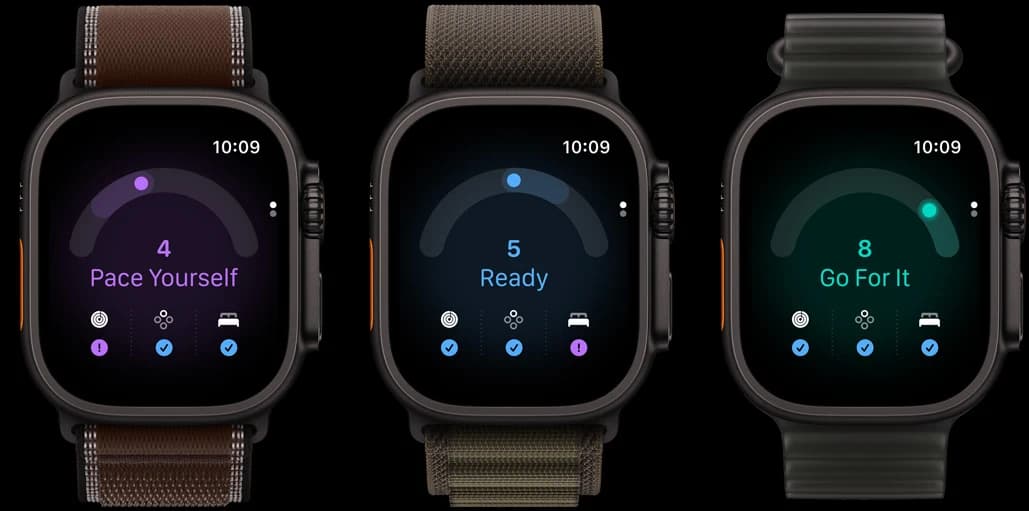
| 8 to 10 | Go for it | No strong warning from the measured inputs |
| 5 to 7 | Ready | A normal training day remains plausible |
| 2 to 4 | Pace Yourself | Inspect sleep, recent load and the purpose of today's session |
| 0 to 1 | Recover | Give recovery more weight and look for the reason |
The classifications come from Apple. The final column is how I would use them as a runner, not a medical recommendation.
How I would use it during marathon training
A marathon plan rarely fails because of one adjusted workout. It often unravels when several tired days turn into a forced session, then a missed long run, then a week spent trying to catch up. A readiness score earns its place when it helps me interrupt that sequence early.
| PLANNED SESSION | WHAT I WOULD CHECK | POSSIBLE ADJUSTMENT |
|---|---|---|
| Easy run | Soreness, symptoms and whether easy pace still feels easy | Keep it conversational, shorten it or rest |
| Intervals or tempo | Recovery trend, sleep, recent hard work and the next key session | Reduce the set or move the workout when several warnings agree |
| Long run | Fueling, pain, illness, accumulated load and time until race day | Protect the training block instead of forcing one heroic run |
I would never cancel a workout because a single number turned purple. I would pay attention when the number agrees with poor sleep, unusual soreness or a rising training load. Pain, illness and concerning symptoms carry more weight than any wearable score.
What I am using while I wait for Ultra 4
My current Apple Watch cannot gain Apple Readiness through a software update. It still records useful signals in Apple Health. Depending on the model and wearing habits, those can include sleep, HRV, resting heart rate, respiratory rate and workouts.
This is one reason we built Rayvik. Rayvik calculates its own Recovery score from compatible Apple Health data that the runner approves, then places that result beside Sleep, Strain and recent running. It gives me a similar morning decision without pretending to be Apple's score and without requiring a new watch.
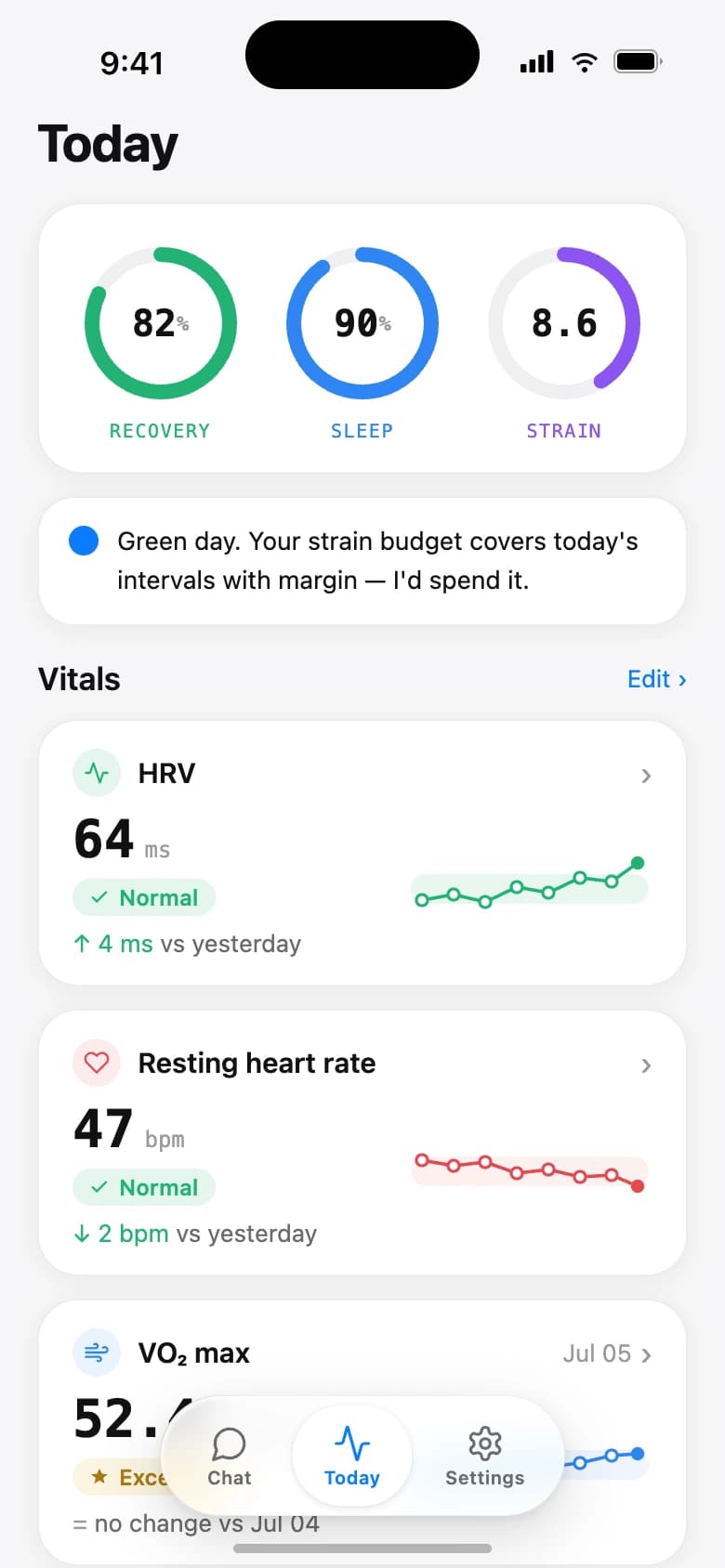
The recovery view I can use with my current Apple Watch
Rayvik reads the compatible Apple Health signals I approve. It puts Recovery beside Sleep and Strain, then adds a short recommendation for the day. The result is Rayvik's own estimate and stays separate from Apple Readiness.
| APPLE READINESS | RAYVIK RECOVERY | |
|---|---|---|
| Where I see it | Readiness app on Apple Watch | Today in Rayvik on iPhone |
| Hardware | Series 12 or Ultra 4 | An Apple Watch that records enough compatible Health data |
| Scale | 0 to 10 | 0 to 100 |
| Published inputs | Activity, vitals and sleep | Available sleep, HRV, heart-rate, respiratory and workout context |
| Running context | Activity and Training Load influence the score | Recovery appears beside Sleep, Strain and running context |
| Relationship | Apple system score | Independent estimate that does not read Apple Readiness |
Rayvik also needs data and time. A watch that stays on the charger overnight cannot provide the same picture as one worn consistently. When the baseline is still forming, the app says it is calibrating instead of giving the estimate more authority than it deserves.
Apple Watch Readiness questions I had
Why is Apple Watch Readiness missing after I install watchOS 27?
watchOS 27 supports several watches, but Apple Readiness is limited to Apple Watch Series 12 and Apple Watch Ultra 4. Updating Series 9, Series 10, Series 11, Ultra 2, Ultra 3 or SE 3 does not add the Readiness app.
Can I see Apple Watch Readiness in the iPhone Health app?
Apple documents Readiness as an app on Apple Watch Series 12 and Ultra 4. The Health app supplies activity, vitals and sleep data, but updating an iPhone to iOS 27 does not unlock Readiness for an unsupported watch.
Which Apple Watch models support Readiness?
Apple Readiness is available only on Apple Watch Series 12 and Apple Watch Ultra 4. Earlier models can still record some of the underlying health signals, depending on their sensors and how they are worn.
How many nights does Apple Watch Readiness need?
Apple requires at least seven nights of overnight-vitals data. You also need Health Details, Activity, overnight vitals and Sleep set up, and you need to have slept with the watch the previous night.
How is Apple Readiness different from Whoop Recovery?
Apple gives a 0 to 10 score from activity, vitals and sleep. Whoop gives a 0 to 100 Recovery score built around its own wearable data and personal baseline. Both answer a similar morning question, but their hardware, scales and calculations differ.
How is Apple Readiness different from Garmin Training Readiness?
Garmin uses sleep score, recovery time, HRV status, acute load, sleep history and stress history. Apple uses activity, daytime and overnight vitals, and sleep. Garmin is more explicit about recent training load, while Apple presents a simpler 0 to 10 daily score.
Can an older Apple Watch still give me a recovery score?
Yes, when your current watch records enough compatible Apple Health data. During the free Rayvik beta, you can get a similar morning recovery view without upgrading your hardware. Rayvik calculates its own Recovery score and shows it beside Sleep, Strain and running context. It does not unlock or copy Apple Readiness.
Keep reading
Sources & notes
I checked Apple's compatibility, setup rules, score ranges and published inputs on September 24, 2026 against the Apple Readiness support page, watchOS 27 compatibility page and Apple Watch setup requirements.
The Whoop and Garmin comparison uses their current published descriptions. I have not yet completed a training-cycle test of Apple Readiness because my Ultra 4 has not arrived. I will update the article after using it alongside real marathon training.
Rayvik is our product. The product description reflects the current app and the compatible Apple Health categories it can read after permission is granted.