An Apple Watch Readiness alternative, right on your wrist
Wake up and check your recovery with a glance at your wrist. The Recovery, Sleep and Strain scores you check on your iPhone are now on Apple Watch too. Add the scores you want to see to compatible slots on your watch face.
If your watch does not support Apple’s native Readiness, Rayvik offers its own Recovery score on compatible older models. Our Apple Watch Readiness compatibility guide explains which watches support Apple’s feature. Here, we’ll set up Rayvik’s scores where you can see them when you wake up.
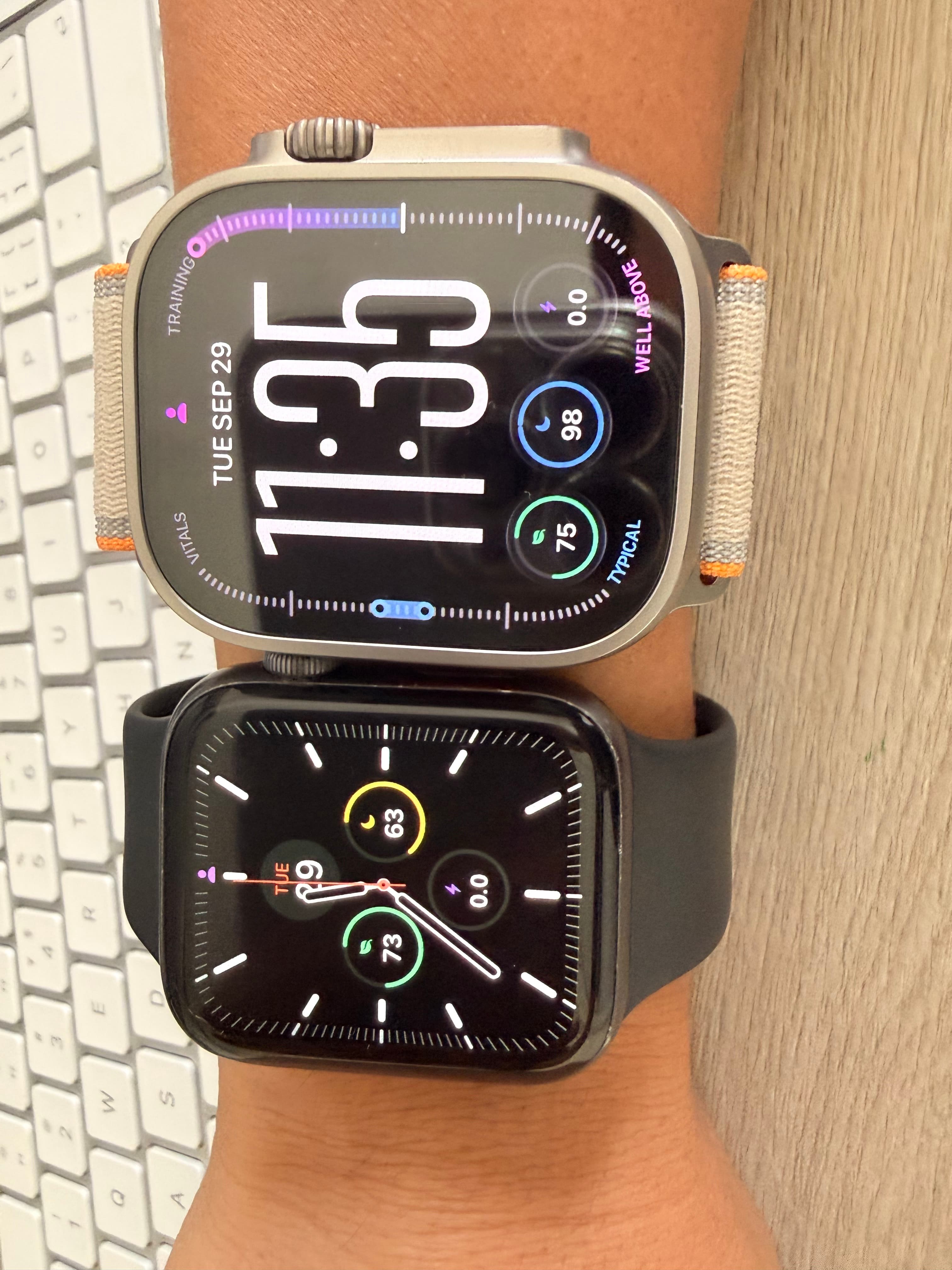
Your morning check, before reaching for your phone
After wearing your watch overnight, you can check Recovery and Sleep on your watch face as the new assessments become available. You do not need to open the iPhone app just to view the scores already on your watch.
Tap a ring when you want to check its date or update status. The Watch app shows all three scores together. Later in the day, Strain adds the exercise load recorded so far; the iPhone Today view is still there when you want the wider running context.
Three rings with different jobs
Recovery and Sleep each use a scale from 0 to 100. Strain runs from 0 to 21.
| RING | WHAT IT TELLS YOU |
|---|---|
| Recovery | How your available physiological signals compare with your usual levels, with sleep taken into account. |
| Sleep | An assessment of your latest recorded main sleep, considering duration, regularity and interruptions where the data supports them. |
| Strain | The exercise load you have accumulated during the current day. |
Read them together. A good Sleep score and a lower Recovery score can coexist. Sleep describes the night you recorded; Recovery also considers your physiological readings. Strain gives you a separate view of the exercise already recorded today.
These rings are status indicators. There is no daily target to close all three, and a higher Strain score is not automatically a better result.
Put the scores beside the things you already check
Each score has its own circular complication, Apple’s name for a small piece of app information on a watch face. Choose one score or add all three if your face has enough compatible slots. You can keep the time, weather and other shortcuts around them.
Modular Ultra offers one layout for Ultra owners. Other Apple Watch models can use faces with compatible circular slots. The available positions depend on the face you choose.
Tap a Rayvik ring to open the Watch app at that metric. There you can see all three scores, their assessment dates and the latest update time. A Refresh button lets you check for available updates.
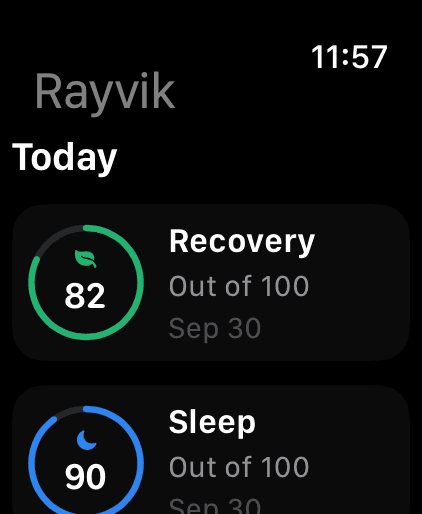
Read your scores.
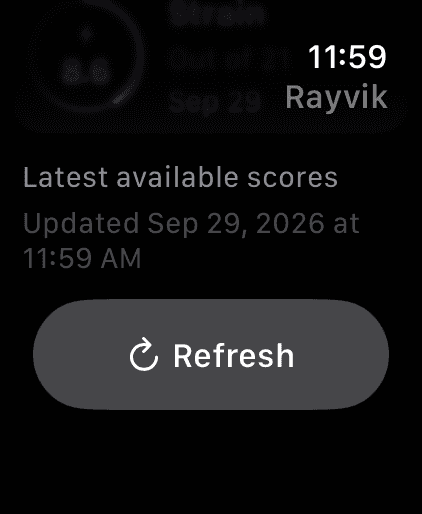
Check the update time.
Set up Rayvik on your watch
You’ll need watchOS 10 or later and Rayvik on a paired iPhone running iOS 18.2 or later. The Watch companion is available through the Rayvik TestFlight beta. Scores depend on your available health data and permissions.
- Install or update Rayvik in TestFlight on your paired iPhone. Open Rayvik and sign in.
- In Rayvik’s TestFlight page, open App Details under Information and use the Apple Watch install or update option when the companion is shown.
- Open Rayvik on your Apple Watch and allow the Health access you want it to use. Give it time to obtain the data needed for your scores.
- Touch and hold your watch face, choose Edit, then go to the complication positions. Select a compatible circular slot and choose Rayvik’s Recovery, Sleep or Strain. Repeat for the other scores if you want them.
- Save the face, then tap a ring to check its score and date in Rayvik.
If Rayvik does not appear in a position’s list, check that its Watch app is installed and that the position accepts circular complications. A different slot or watch face may be needed.
What “latest” means on the watch face
Rayvik updates its scores as supporting health data becomes available. The watch face displays the latest available result; watchOS controls when background work and complication refreshes run. Raising your wrist does not guarantee a new calculation at that moment.
Sleep and Recovery keep their last available assessment while a new one is pending. Strain follows the current day. If you want to know whether a morning score reflects your latest sleep, tap the ring and check the assessment date and status in the Watch app.
A missing score appears as a dash. You may see a waiting message while Rayvik gathers enough data, or “New recovery pending” when a newer sleep assessment has arrived. Use Refresh to check again. A refresh cannot create health records that are not yet available.
Using Rayvik on Apple Watch
Can I see Rayvik Recovery on my Apple Watch face?
Yes. Rayvik provides a circular Recovery complication, with separate Sleep and Strain complications. Add them to compatible slots on your watch face, then tap a ring to open the Watch app and check the assessment date.
Do I need to open Rayvik on my iPhone every morning?
You can view scores already available on your watch without opening the iPhone app. Initial setup requires Rayvik on your paired iPhone. The Watch app can check locally available Health data; new scores still depend on sufficient data and update timing.
Does Rayvik unlock Apple’s native Readiness on older watches?
No. Rayvik provides its own Recovery estimate, alongside Sleep and Strain. Its Watch companion requires watchOS 10 or later and a paired iPhone running iOS 18.2 or later. Rayvik and Apple use different scoring systems.
Sources & notes
Rayvik is our product. Kai is Rayvik’s founder, and this guide describes our Watch companion in the TestFlight beta. Recovery is Rayvik’s own estimate, not Apple’s Readiness score. Scores and their availability depend on recorded health data and permissions. Setup references include Apple’s watch-face customization instructions and Apple’s TestFlight installation guide.